
Sofa: Downtime Organizer
Persönliche Watchlist-App für Filme, Bücher, Spiele und Podcasts
Sofa macht Freizeit bewusster: Du sammelst Filme, Serien, Bücher, Spiele, Podcasts und mehr in persönlichen Listen – und weißt immer, was als nächstes auf dem Plan steht. Apple hat Sofa mehrfach als App des Tages ausgezeichnet, MacStories bezeichnet sie als ihre Lieblings-Watchlist-App. Seit Version 4 ist ein vollständiger Podcast-Player mit CarPlay-Unterstützung integriert. Der kostenlose Kern bleibt dauerhaft kostenlos – Super Sofa schaltet Themes, Smart Lists und erweiterte Statistiken frei.





Das sagen Nutzer
→ StabilDie hilfreichsten 6 der neusten 13 Bewertungen
Basierend auf App Store Rezensionen · Stand: Mai 2026
Preis & Sparen
FreemiumKostenlos mit dauerhaft funktionalem Kern – Super Sofa (Abo) schaltet Themes, Smart Lists, Sticky Notes und erweiterte Statistiken frei.
10 In-App-Käufe · 0,99€ – 34,99€
Über den Entwickler
Ein-Mann-Studio von Designer und Entwickler Shawn Hickman, bekannt für die preisgekrönte App Sofa: Downtime Organizer. Die App wurde von Apple als App of the Day ausgezeichnet.
Vertrauenswürdigkeit
App-Info
Hey gang, Sofa 5 is here, and it's the biggest update in the app's history. Here's what's new...
PROGRESS TRACKING
Track TV shows, books, and games with progress rings on covers, plus a new Enjoying section that always knows what's next.
PODCAST PLAYER
A full podcast player built in, with Up Next, Voice Boost, chapters, offline downloads, CarPlay, and a persistent mini player.
PLANNER
A new planning hub for events, tasks, and notes—with day-by-day itineraries, maps, budgets, weather, and automatic tracking of upcoming releases.
LISTS
Two new list types, custom grouping, and 28+ new Smart List filters that work with your Ingredients.
LOGBOOK & STATS
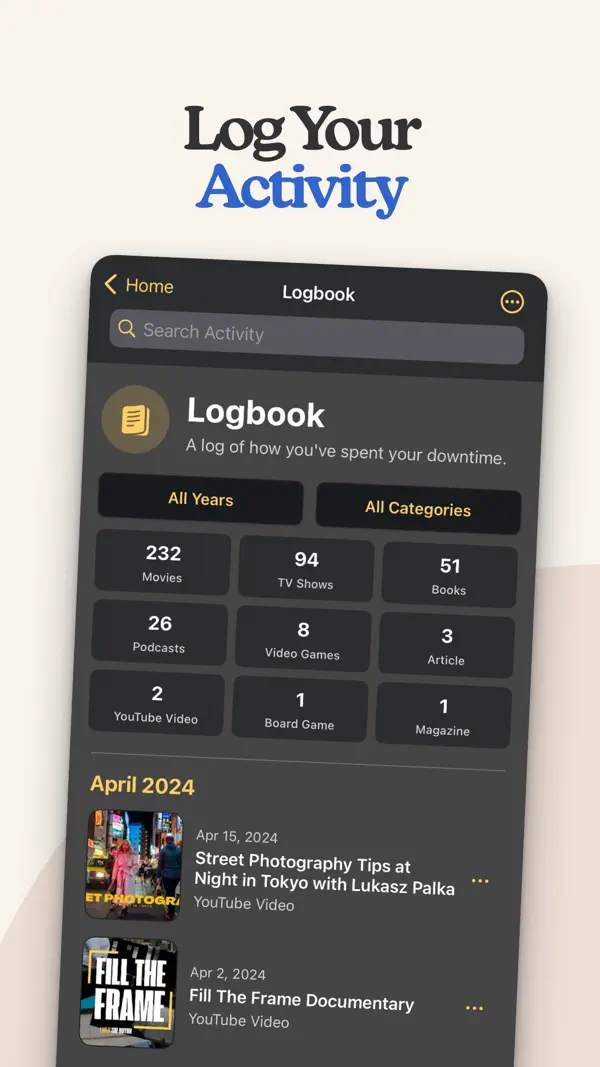
A rebuilt Logbook and a new stats dashboard for every media type, with timelines, breakdowns, and insights about your habits.
AND MORE
Unified Search, bulk actions, 40+ Shortcuts with Siri, home and lock screen widgets, and Apple Intelligence for natural language Smart Lists.
============================
Version 5.0.4
============================
NEW
- "Catch Up to Here" (renamed from "Mark All Up to Here") now has an option to complete each episode using its own air date, so older watches sort into the weeks they actually aired.
- Mark episodes watched without a date — they count toward progress but stay off your Logbook and time-based stats.
- Skip episodes and seasons. Skipped items don't count toward progress, Up Next, Stats, or completion math, and won't block Finish Show.
FIXES
- Crash when opening certain lists with custom cover images.
- Crash when adding a custom image URL to a list item.
- Crash when reordering Ingredients.
- Share Extension crash when selecting a category for a shared item.
- Some image URLs were rejected when using "Add from URL" for cover images.
- Local search now finds titles when apostrophes are omitted (e.g., "youve" matches "You've Got Mail").
- Signing in on a new device could create duplicate starter lists alongside synced iCloud lists.
- "Watch Again" no longer duplicates ratings, tags, and custom properties onto the new copy, which was piling up duplicates in favorites and smart lists. Runtime, genre, and other intrinsic info still carries over.
- New manual items created in a Smart List now default to The Pile.
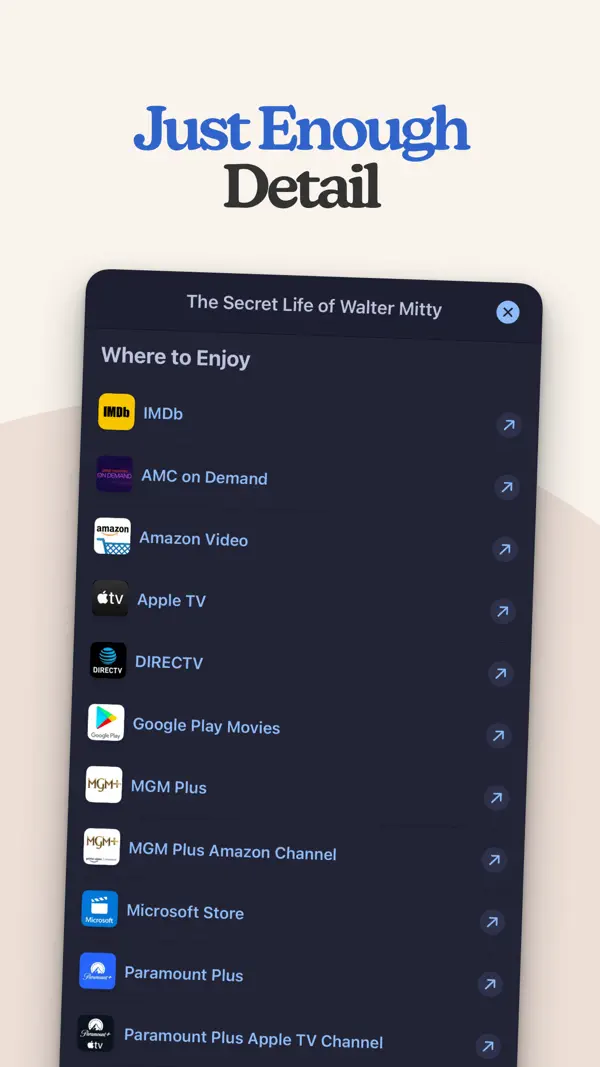
- "Where to Watch" no longer shows duplicate entries. Providers with multiple options now appear as one row — e.g., Apple TV as "Stream · Rent · Buy."
- Event AI summaries no longer produce mangled characters in unsupported languages; Sofa falls back to the static summary.
- Episode count on the show detail page updates immediately when skipping episodes.
- Season cover image now displays when choosing a date for a season.
- Episode Completion Status filter now correctly narrows results to shows containing the selected statuses.
- Setting a reminder on a TV show episode appeared to do nothing.
- "Show Completed" toggle incorrectly appeared checked when completed items were visible.
- "Find Logbook Item" Shortcut inconsistently returned TV episodes when filtering by Date Added.
- Logbook Item Shortcut variables now include Show Title, Episode Label (e.g., S1E5), Season Number, and Episode Number for TV episodes.
- Watched TV episodes sometimes missing from the Logbook Item picker, text search, and saved shortcut variables on re-run.
- Ingredient pills lagging when switching to a longer value.
- A "Custom Property" entry could remain in a Data Card's Displayed Properties after the Ingredient was deleted.
- "Edit List Details" from long-pressing a list on iPhone showed a shortened Group By menu and "None" when grouped by a system property or Ingredient.
- Data Card "Displayed Properties" picker on Smart Lists was missing System Properties and Services sections.
- Smart Lists set to Collection List now correctly keep completed items visible.
============================
As always, don't hesitate to reach out with feedback, issues, and suggestions. I'm always happy to hear from you: [email protected]
– Shawn
Unser Fazit
Sehr gutKaum bekannt, aber von Apple mehrfach ausgezeichnet: Sofa macht Freizeit bewusster, indem man Filme, Bücher, Spiele und Podcasts in persönlichen Listen sammelt statt impulsiv zu konsumieren.
Der kostenlose Kern ist dauerhaft nutzbar, Apple Design Award zeigt den Qualitätsanspruch. Für alle, die ihre Freizeit strukturieren wollen, eine echte Entdeckung.
Häufige Fragen
Was ist Sofa: Downtime Organizer?
Ist Sofa: Downtime Organizer kostenlos?
Was sind die Vorteile von Sofa: Downtime Organizer?
Welche Nachteile hat Sofa: Downtime Organizer?
Wie gut ist Sofa: Downtime Organizer bewertet?
Ähnliche Produktivität-Apps

Grok - KI Assistent
Bester kostenloser KI-Assistent mit Echtzeit-Infos und Bildgenerierung

OCR Scanner - QuickScan
Schneller OCR-Dokumentenscanner mit Texterkennung
one sec | App Zeitlimit Sperre
Verhindert reflexartiges App-Öffnen durch eine kurze Atempause vor Social Media.

2FA Authenticator (2FAS)
Open-Source-Authenticator für Zwei-Faktor-Codes – privat und sicher

Bitwarden
Open-Source-Passwort-Manager — gratis, sicher, auf allen Geräten
Bester kostenloser KI-Assistent mit Echtzeit-Infos und Bildgenerierung
Schneller OCR-Dokumentenscanner mit Texterkennung
Verhindert reflexartiges App-Öffnen durch eine kurze Atempause vor Social Media.
Open-Source-Authenticator für Zwei-Faktor-Codes – privat und sicher
Open-Source-Passwort-Manager — gratis, sicher, auf allen Geräten